
최신RedHat Red Hat Certified Engineer - RHCE (RHCE Korean Version) - RHCE Korean무료샘플문제
문제1
올바른 텍스트
vg0 아래에 lv1이라는 논리 볼륨 하나가 생성됩니다. 이 논리 볼륨의 초기 크기는 100MB입니다. 이제 필요한 크기는 500MB입니다. 데이터 손실 없이 논리 볼륨의 크기를 500MB로 성공적으로 조정합니다. 또한, 크기를 온라인으로 늘려야 합니다.
올바른 텍스트
vg0 아래에 lv1이라는 논리 볼륨 하나가 생성됩니다. 이 논리 볼륨의 초기 크기는 100MB입니다. 이제 필요한 크기는 500MB입니다. 데이터 손실 없이 논리 볼륨의 크기를 500MB로 성공적으로 조정합니다. 또한, 크기를 온라인으로 늘려야 합니다.
정답:
TheLVMsystemorganizesharddisksintoLogicalVolume(LV)groups.Essentiallyphysicalharddiskpartitions(orpossiblyRAIDarrays)aresetupinabunchofequalsizedchunksknownasPhysicalExtents(PE).AsthereareseveralotherconceptsassociatedwiththeLVMsystemlet'sstartwithsomebasicdefinitions:PhysicalVolume(PV)isthestandardpartitionthatyouaddtotheLVMmix.Normallyaphysicalvolumeisastandardprimaryorlogicalpartition.ItcanalsobeaRAIDarray.PhysicalExtent(PE)isachunkofdiskspace.EveryPVisdividedintoanumberofequalsizedPEs.EveryPEinaLVgroupisthesamesize.DifferentLVgroupscanhavedifferentsizedPEs.LogicalExtent(LE)isalsoachunkofdiskspace.EveryLEismappedtoaspecificPE.LogicalVolume(LV)iscomposedofagroupofLEs.Youcanmountafilesystemsuchas/homeand/varonanLV.VolumeGroup(VG)iscomposedofagroupofLVs.ItistheorganizationalgroupforLVM.Mostofthecommandsthatyou'lluseapplytoaspecificVG.
VerifythesizeofLogicalVolume:lvdisplay/dev/vg0/lv1
VerifytheSizeonmounteddirectory:df-hordf-hmounteddirectoryname
Use:lvextend-L+400M/dev/vg0/lv1
ext2online-d/dev/vg0/lv1tobringextendedsizeonline.
AgainVerifyusinglvdisplayanddf-hcommand.
VerifythesizeofLogicalVolume:lvdisplay/dev/vg0/lv1
VerifytheSizeonmounteddirectory:df-hordf-hmounteddirectoryname
Use:lvextend-L+400M/dev/vg0/lv1
ext2online-d/dev/vg0/lv1tobringextendedsizeonline.
AgainVerifyusinglvdisplayanddf-hcommand.
문제2
올바른 텍스트
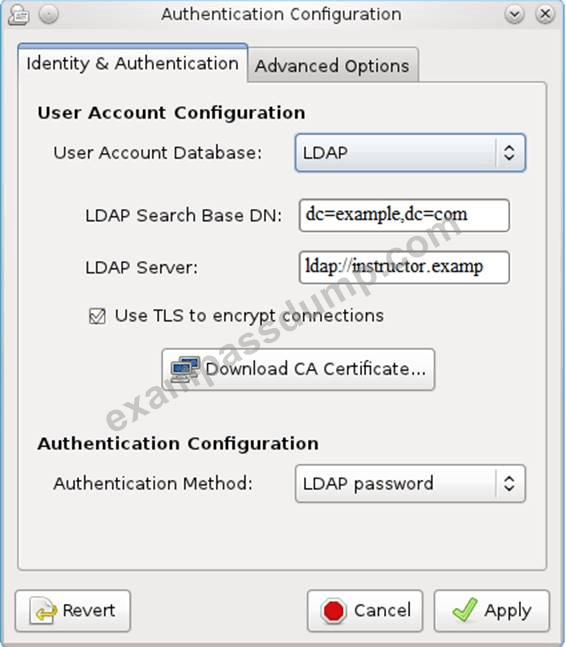
사용자 인증은 192.168.0.254의 LDAP 도메인을 통해 제공되었습니다. ldapuser를 얻으려면 다음 요구 사항을 충족해야 합니다.
-LdapuserX는 시스템에 로그인할 수 있어야 하며, X는 호스트 이름 번호입니다. 하지만 autofs 서버가 자동으로 마운트되도록 설정하기 전까지는 ldapuser의 홈 디렉터리를 마운트할 수 없습니다.
- 모든 LDAP 사용자의 비밀번호는 "password"입니다.
올바른 텍스트
사용자 인증은 192.168.0.254의 LDAP 도메인을 통해 제공되었습니다. ldapuser를 얻으려면 다음 요구 사항을 충족해야 합니다.
-LdapuserX는 시스템에 로그인할 수 있어야 하며, X는 호스트 이름 번호입니다. 하지만 autofs 서버가 자동으로 마운트되도록 설정하기 전까지는 ldapuser의 홈 디렉터리를 마운트할 수 없습니다.
- 모든 LDAP 사용자의 비밀번호는 "password"입니다.
정답:
see explanation below. Explanation system-config-authentication &
문제3
올바른 텍스트
YUM 저장소는 http://server.domain11.example.com/pub/x86_64/Server에서 제공되었습니다.
이 위치를 기본 저장소로 사용하도록 시스템을 구성합니다.
올바른 텍스트
YUM 저장소는 http://server.domain11.example.com/pub/x86_64/Server에서 제공되었습니다.
이 위치를 기본 저장소로 사용하도록 시스템을 구성합니다.
정답:
vim/etc/yum.repos/base.repo[base]name=basebaseurl=http://server.domain11.example.com/pub/x86_64/Servergpgcheck=0enable=1SaveandExitUseyumlistforvalidationtheconfigurationiscorrectiflistthepackageinformation.IftheYumconfigurationisnotcorrectthenmaybecannotanswerthefollowingquestions.
문제4
올바른 텍스트
외부 검증 서버에 바인딩합니다.
시스템 server.domain11.example.com은 LDAP 검증 서비스를 제공하며, 시스템은 필요에 따라 이 서비스에 바인딩해야 합니다.
검증 서비스의 기본 DN은 dc=example,dc=com입니다.
LDAP는 계정정보 및 검증정보 제공에 사용되며 http://server.domain11.example.com/pub/EXAMPLE-CA-CERT 인증을 이용하여 암호화 연결 및 사용
올바른 구성 후, ldapuser1은 시스템에 로그인할 수 있으며, autofs 질문을 마칠 때까지 HOME 디렉토리가 없습니다. ldapuser1 비밀번호는 비밀번호입니다.
올바른 텍스트
외부 검증 서버에 바인딩합니다.
시스템 server.domain11.example.com은 LDAP 검증 서비스를 제공하며, 시스템은 필요에 따라 이 서비스에 바인딩해야 합니다.
검증 서비스의 기본 DN은 dc=example,dc=com입니다.
LDAP는 계정정보 및 검증정보 제공에 사용되며 http://server.domain11.example.com/pub/EXAMPLE-CA-CERT 인증을 이용하여 암호화 연결 및 사용
올바른 구성 후, ldapuser1은 시스템에 로그인할 수 있으며, autofs 질문을 마칠 때까지 HOME 디렉토리가 없습니다. ldapuser1 비밀번호는 비밀번호입니다.
정답:
yum-yinstallsssdauthconfig-gtkkrb5-workstationauthconfig-gtk//openthegraphicalinterfaceModifyuseraccountdatabasetoldapfillupDNandLDAPSERVERasquestionsrequireduseTLStoencryptconnectionsmakingtickwritehttp://server.domain11.example.com/pub/EXAMPLE-CA-CERTtodownloadcaauthenticationmethodchooseldappassword.Youcantestiftheldapuserisaddedbythefollowingcommand:Idldapuser1Note:userpassworddoesn'tnotneedtoset
문제5
올바른 텍스트
시스템에 FTP 서비스를 구성하고, 익명 로그인에 대한 원격 접근을 허용하고, 이 서비스를 통해 프로그램을 다운로드하세요. 시스템 재부팅 후에도 서비스는 계속 실행됩니다.
올바른 텍스트
시스템에 FTP 서비스를 구성하고, 익명 로그인에 대한 원격 접근을 허용하고, 이 서비스를 통해 프로그램을 다운로드하세요. 시스템 재부팅 후에도 서비스는 계속 실행됩니다.
정답:
yuminstallvsftpd/etc/init.d/vsftpdstartchkconfigvsftpdon
문제6
올바른 텍스트
볼륨 그룹을 생성하고 확장 볼륨으로 8M을 설정합니다. 50개의 확장 볼륨을 포함하는 볼륨 그룹을 볼륨 그룹 lv(lvshare)로 분할하고, ext4 파일 시스템으로 만들고 /mnt/data에 자동으로 마운트합니다. 부동 소수점 범위 크기는 380M에서 400M 사이로 설정합니다.
올바른 텍스트
볼륨 그룹을 생성하고 확장 볼륨으로 8M을 설정합니다. 50개의 확장 볼륨을 포함하는 볼륨 그룹을 볼륨 그룹 lv(lvshare)로 분할하고, ext4 파일 시스템으로 만들고 /mnt/data에 자동으로 마운트합니다. 부동 소수점 범위 크기는 380M에서 400M 사이로 설정합니다.
정답:
#fdisk
#partprobe
#pvcreate/dev/vda6
#vgcreate-s8Mvg1/dev/vda6-s
#lvcreate-nlvshare-l50vg1-l
#mkfs.ext4/dev/vg1/lvshare
#mkdir-p/mnt/data
#vim/etc/fstab/dev/vg1/lvshare/mnt/dataext4defaults00
#mount-a
#df-h
#partprobe
#pvcreate/dev/vda6
#vgcreate-s8Mvg1/dev/vda6-s
#lvcreate-nlvshare-l50vg1-l
#mkfs.ext4/dev/vg1/lvshare
#mkdir-p/mnt/data
#vim/etc/fstab/dev/vg1/lvshare/mnt/dataext4defaults00
#mount-a
#df-h
문제7
올바른 텍스트
zsh라는 패키지가 ftp://server1.example.com의 /pub/updates 디렉터리에 설치되어 있으며, FTP 서버는 192.168.0.254입니다. zsh 패키지를 설치하세요.
올바른 텍스트
zsh라는 패키지가 ftp://server1.example.com의 /pub/updates 디렉터리에 설치되어 있으며, FTP 서버는 192.168.0.254입니다. zsh 패키지를 설치하세요.
정답:
rpm-ivhftp://server1/example.com/pub/updates/zsh-*or
Logintoftpserver:ftpftp://server1.example.comusinganonymoususer.
Changethedirectory:cdpubandcdupdates
Downloadthepackage:mgetzsh-*
Quitfromtheftpprompt:bye
Installthepackage
rpm-ivhzsh-*
Verifyeitherpackageisinstalledornot:rpm-qzsh
Logintoftpserver:ftpftp://server1.example.comusinganonymoususer.
Changethedirectory:cdpubandcdupdates
Downloadthepackage:mgetzsh-*
Quitfromtheftpprompt:bye
Installthepackage
rpm-ivhzsh-*
Verifyeitherpackageisinstalledornot:rpm-qzsh
문제8
올바른 텍스트
autofs를 구성하여 로그인이 성공적으로 완료된 후 홈 디렉토리 autofs가 있는지 확인합니다. 이 홈 디렉토리는 /rhome/ldapuser40으로 공유되며 IP 주소는 172.24.40.10입니다. 또한 다른 LDAP 사용자도 홈 디렉토리를 정상적으로 사용할 수 있어야 합니다.
올바른 텍스트
autofs를 구성하여 로그인이 성공적으로 완료된 후 홈 디렉토리 autofs가 있는지 확인합니다. 이 홈 디렉토리는 /rhome/ldapuser40으로 공유되며 IP 주소는 172.24.40.10입니다. 또한 다른 LDAP 사용자도 홈 디렉토리를 정상적으로 사용할 수 있어야 합니다.
정답:
#chkconfigautofson
#cd/etc/
#vim/etc/auto.master/rhome/etc/auto.ldap
#cpauto.miscauto.ldap
#vimauto.ladpldapuser40-rwsoftintr172.24.40.10:/rhome/ldapuser40*-rwsoftintr172.16.40.10:/rhome/&
#serviceautofsstop
#serverautofsstart
#showmount-e172.24.40.10
#su-ladpuser40
#cd/etc/
#vim/etc/auto.master/rhome/etc/auto.ldap
#cpauto.miscauto.ldap
#vimauto.ladpldapuser40-rwsoftintr172.24.40.10:/rhome/ldapuser40*-rwsoftintr172.16.40.10:/rhome/&
#serviceautofsstop
#serverautofsstart
#showmount-e172.24.40.10
#su-ladpuser40
문제9
올바른 텍스트
호스트 이름, IP 주소, 게이트웨이, DNS를 구성하세요.
호스트 이름: station.domain40.example.com
/etc/sysconfig/네트워크
호스트 이름=abc.com
호스트 이름 abc.com
IP 주소: 172.24.40.40/24
게이트웨이172.24.40.1
DNS:172.24.40.1
올바른 텍스트
호스트 이름, IP 주소, 게이트웨이, DNS를 구성하세요.
호스트 이름: station.domain40.example.com
/etc/sysconfig/네트워크
호스트 이름=abc.com
호스트 이름 abc.com
IP 주소: 172.24.40.40/24
게이트웨이172.24.40.1
DNS:172.24.40.1
정답:
#cd/etc/syscofig/network-scripts/
#ls
#vimifcfg-eth0(ConfigureIPAddressGatewayandDNS)IPADDR=172.24.40.40GATEWAY=172.24.40.1DNS1=172.24.40.1
#vim/etc/sysconfig/network(ConfigureHostName)HOSTNAME=station.domain40.example.comORGraphicalInterfaces:System->Preference->NetworkConnections(ConfigureIPAddressGatewayandDNS)Vim/etc/sysconfig/network(ConfigureHostName)
#ls
#vimifcfg-eth0(ConfigureIPAddressGatewayandDNS)IPADDR=172.24.40.40GATEWAY=172.24.40.1DNS1=172.24.40.1
#vim/etc/sysconfig/network(ConfigureHostName)HOSTNAME=station.domain40.example.comORGraphicalInterfaces:System->Preference->NetworkConnections(ConfigureIPAddressGatewayandDNS)Vim/etc/sysconfig/network(ConfigureHostName)
문제10
올바른 텍스트
사용자 계정을 만듭니다.
다음 사용자, 그룹 및 그룹 멤버십을 만듭니다.
관리자 그룹
사용자 natasha는 adminuser를 하위 그룹으로 사용합니다.
사용자 Harry도 하위 그룹으로 adminuser를 사용합니다.
사용자 sarah는 시스템에서 상호 작용하는 SHELL에 액세스할 수 없으며 adminuser, natasha, harry, sarah의 멤버가 아니며 비밀번호는 redhat입니다.
올바른 텍스트
사용자 계정을 만듭니다.
다음 사용자, 그룹 및 그룹 멤버십을 만듭니다.
관리자 그룹
사용자 natasha는 adminuser를 하위 그룹으로 사용합니다.
사용자 Harry도 하위 그룹으로 adminuser를 사용합니다.
사용자 sarah는 시스템에서 상호 작용하는 SHELL에 액세스할 수 없으며 adminuser, natasha, harry, sarah의 멤버가 아니며 비밀번호는 redhat입니다.
정답:
groupaddadminuseruseraddnatasha-Gadminuseruseraddharyy-Gadminuseruseraddsarah-s/sbin/nologinPasswdusername//tomodifypasswordorechoredhat|passwd--stdinusernameidnatasha//toviewusergroup.